
Free GMAT Vocabulary Flashcards
Study with Manhattan Review's GMAT Vocabulary Flashcards
Over Manhattan Review's many years of helping thousands of students prepare for the GMAT, we've discovered that many of them have difficulty with vocabulary words for the business school admission exam. To help them overcome this hurdle, our instructors created flashcards for their use as a proven vocabulary study aid. We've now made them available online in a digital, interactive format at no cost, after analyzing past tests to find frequently-appearing words.
As you review the vocabulary words using the flashcards, they take note of which ones you knew and which you didn't, as well as which you were unsure about, helping to determine the weak areas you need to work on. Among the most valuable features this tool offers is remembering the words you didn't know, and repeatedly presenting them to you to review until you've learned every word in the set you're working on.
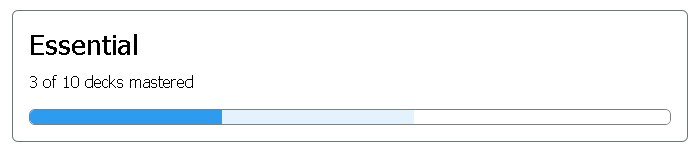
We've created our digital flashcards with an innovative color-based scheme that makes it easy for you to follow your progress. The vocabulary words appear in 50-word batches called "decks," and several decks are organized together in four categories: Essential; Basic; Intermediate; and Advanced. As an example, there might be 10 decks in the Essential category. When you're working on the vocabulary, you'll be able to see all of the Categories at the top of the page, showing how much of them you've finished and how much is left to go. In the following example, the dark blue section shows the student has mastered three of the 10 decks in the Essential category. The light blue indicates there are three more the student is working on, and the white shows four questions they haven't looked at yet.
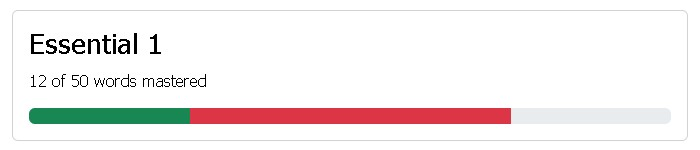
You'll see a review of the decks sorted by category below the Categories progress summary. Under our color-coded system, when you begin working on each 50-word deck, its progress bar is gray. You're initially presented each word in the deck once, and whenever you confirm that you know one, it's added to the progress bar's green section. Words that you don't know are added to the red section. The Essential 1 example below shows in green that the student knew 12 words, in red that they didn't know 24, and with the remaining gray section that they weren't shown the deck's 14 other words yet.
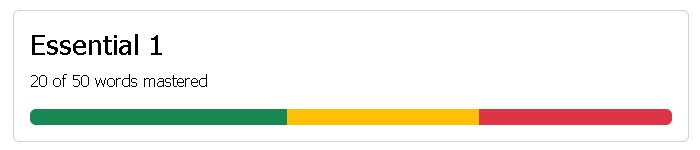
After our flashcard tool has shown you every word in a deck once, it will go back and present the ones you didn't know again. If you confirm that you now know a word, it's added to the yellow part of the bar. The Essential 1 graphic below indicates the student's mastery of 20 words in green, and that they now know 15 of the 30 words they didn't initially know in yellow. The red section shows the student was either not shown the remaining 15 words again yet, or hadn't retained their meaning. You will be shown every word that you didn't know at first at least twice more. The first time that you demonstrate you've learned a word, it goes into the yellow section from the red. When you indicate for a second time that you now know it, the system visualizes that you've mastered the word by moving it from yellow to green. By using this method of learning reinforcement, our digital vocabulary flashcards ensure that you remember the words.
Now that you know how it works, there's no reason to wait any longer. Begin honing your GMAT vocabulary skills today by clicking the button to start using this free, user-friendly flashcard study tool!